June 22, 2025 | 3 min read
Credit Card Fraud Prevention with Eventact
Eventact offers smart tools designed to prevent unauthorized credit card charges, reduce excessive processing fees, and protect against costly chargebacks-a growing concern for events and conferences vulnerable to fraudulent visa seekers.
The Challenge: Some individuals register for conferences with no intention of attending; instead, they use the registration to obtain a visa fraudulently. These attempts may involve stolen credit cards, which can result in chargebacks weeks or months after the event-costing your organization time, money, and reputational harm.
Eventact's Solutions:
1. Control Automatic Charges Based on Data Mismatch:
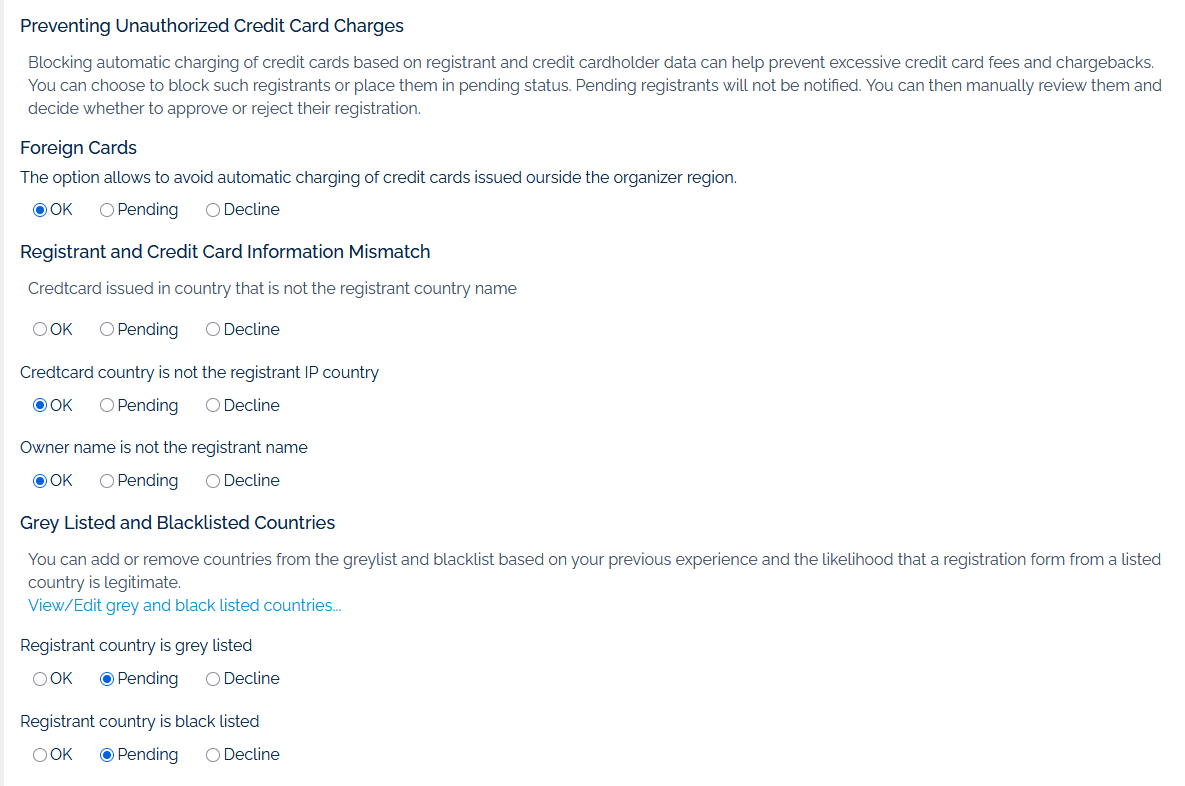
Eventact performs a series of checks to identify and manage potential fraudulent transactions. You can configure how the system handles risks and discrepancies:
Specific Mismatch Checks:
- Registrant Country vs. Credit Card Country: Identifies if the credit card was issued in a country different from the registrant's declared country.
- Credit Card Country vs. Registrant IP Country: Verifies if the card's country matches the IP address location.
- Card Owner's Name vs. Registrant's Name: Identifies discrepancies between the cardholder's name and the registrant's name. (Note: This may be valid when someone else legitimately pays.)
Action for Mismatches:
For any identified mismatch, you can choose to:
- Set Registration Status to "Pending": The registration will be recorded, but the credit card will not be charged, allowing for manual review and approval or rejection by the back office.
- Decline Registration: The system automatically rejects the registration.
2. Restricting Use of Foreign Cards:
You can block automatic charges for credit cards issued outside your organization's region. This reduces processing fees and limits exposure to high-risk international transactions.
3. Blocklisted and Watchlisted Countries:
Control registrations based on the registrant's country:
- Watchlisted Countries: Registrations from these countries may require a manual review process before confirmation and credit card processing is completed.
- Blocklisted Countries: Registrations from these countries are automatically declined.
How to Set Up Eventact Credit Card Security Options
Configuring these options in Eventact is simple:
At the company level, go to Payments > Payment Methods > Credit Cards . Under the credit gateway options, you will find the settings discussed in this article, including a link to edit your list of Watchlisted and Blocklisted countries.
Summary:
By leveraging Eventact's fraud prevention tools, event organizers can significantly reduce the risk of unauthorized transactions, avoid costly chargebacks, and safeguard the integrity of their registration process-all while maintaining a smooth experience for genuine participants. For detailed instructions or assistance, contact the Eventact Support team-we're here to help.